BBEdit Product Tour
Exercise Total Control Over Text | Work Your Way | Command Files, Folders, Disks, and Servers | Enjoy Textual Omnipotence | Live Up To Standards | Integrate Smoothly Into Existing Workflows
Live Up To Standards
- reduce coding errors with BBEdit’s automated HTML and CSS markup tools (including support for HTML5)
- ensure standards compliance and proper code structure (for entire sites, whole pages, page fragments and generated code) using BBEdit’s built-in HTML syntax checking
- preview your site right in BBEdit even if it uses PHP, JSP, or other server-side processing methods
- use the macOS spelling checker to catch those embarrassing mistakes before the rest of the world sees them
(Tip: click each image below to see it full size in a new browser tab.)
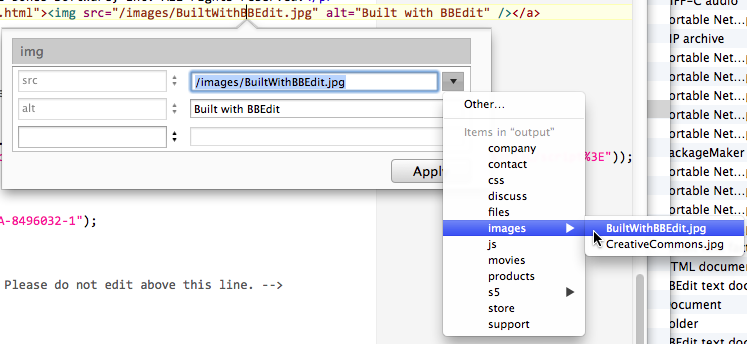
BBEdit makes it easy to get it right the first time with its automated HTML and CSS tools.
The markup panel is driven by the same information that informs BBEdit’s markup syntax checker, so that it shows you tags, attributes, and attribute values that are appropriate for the point in your document in which you’re editing.
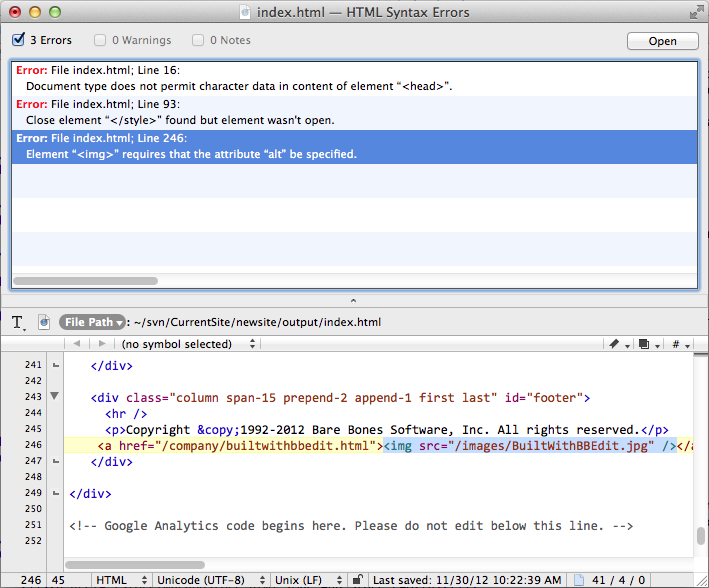
Find errors in your code early and fix them easily with BBEdit’s HTML Syntax checker.
You can verify the correctness of your code even in partial documents, in documents with generated content, even in documents using server-side includes! You can also mark portions of documents to skip when checking syntax.
The HTML syntax checker makes it easier to verify syntactic correctness in HTML/XHTML source files that contain embedded scripts (for example, embedded Perl or PHP), as well as in source files that are not complete HTML/XHTML documents (such as those that will be merged with page template files).
Preview your pages right in BBEdit
The “Preview in BBEdit” command uses WebKit (the same engine that powers Safari, Google Chrome, and other popular web browsers) to preview your code. The preview window updates your window as you edit, without requiring you to save, reload, or switch applications. If you wish, you may use any available Web browser for previewing as well. New BBEdit preview windows now include access to the powerful WebKit Inspector, so that you can inspect the runtime behavior of your page, debug JavaScript on the fly, and more.

Find out what’s new in BBEdit 15. Or check out the full feature list.


